The Kith Guide › Character management
📈 Attribute Planner
Plan jewellery, food and SEAs, and see your effective stats after diminishing returns.
The Attribute Planner calculates your character's six core attributes (Melee General, Toughness, Endurance, Ranged General, Defense General, Opportune Chance) across all sources — jewelry, familiar, food, buffs, and armor/SEAs — and applies the game's diminishing returns formula to show your effective attribute, which is what actually matters for combat. Based on Fez's Attribute/SEA Calculator.
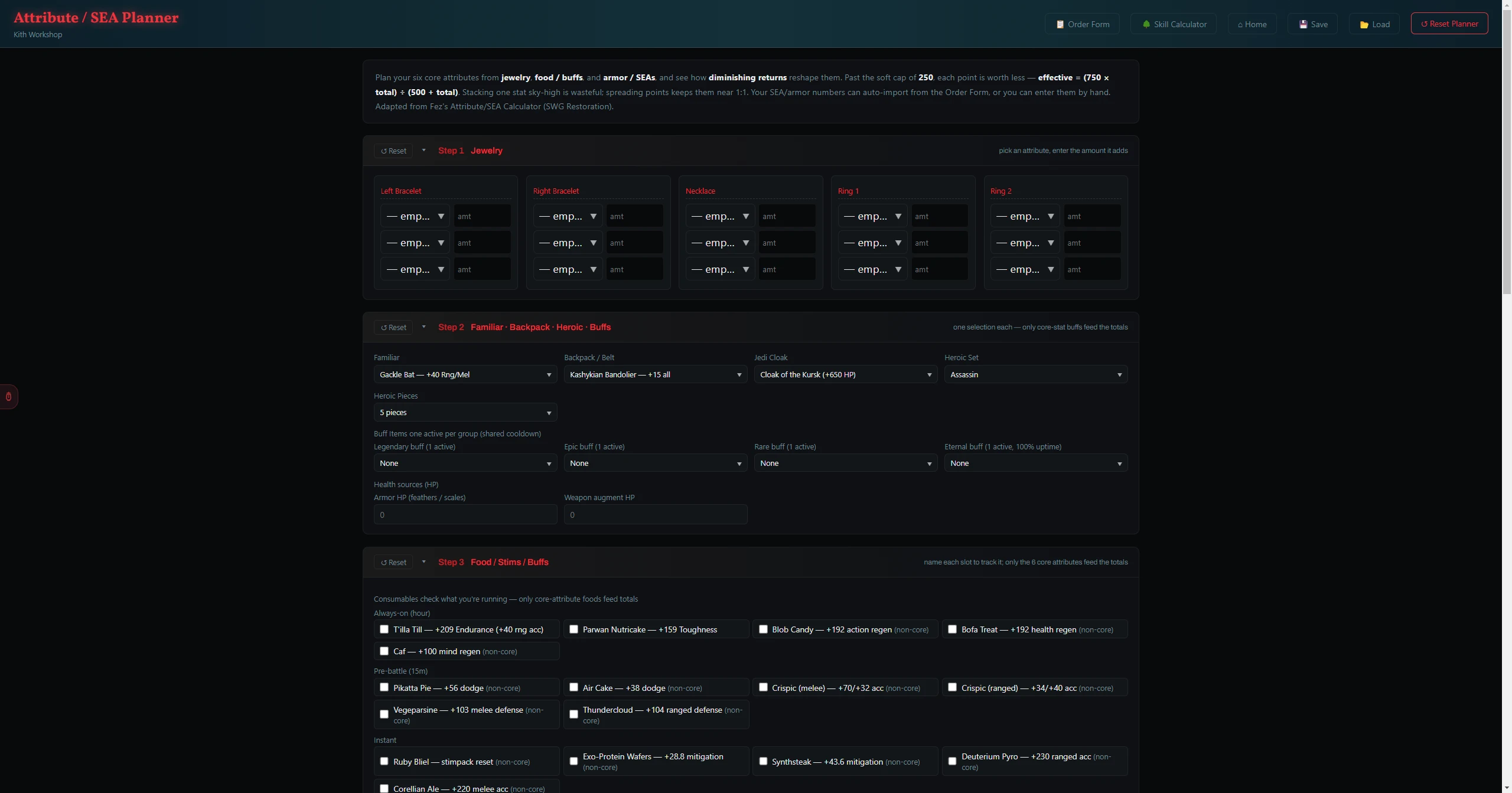
Past the soft cap of 250 total on any attribute, each additional point is worth less. The effective value formula is: Effective = (750 × Total) ÷ (500 + Total). The Results table shows both your raw Total and the post-DR Effective for each attribute.
Each jewelry slot (ring, bracelet, necklace, etc.) is a card. For each piece, select which attribute it adds and enter the amount it provides.
- Select your Familiar from the dropdown — it shows the attribute bonus that familiar provides.
- Select your Backpack / Belt type and Heroic Set (bonuses activate at certain piece counts).
- If you wear a Jedi Cloak, select it — it adds flat Health (its Force/skill mods are shown but don't feed core-attribute totals).
- Under Buff Items, select one item per cooldown group. Each group shows what it adds.
- Under Health sources, enter HP from armor feathers/scales and HP from weapon augments.
The food catalog has clickable cards for common consumables. Click any food you are running to toggle it on (teal border). The attribute bonus is added automatically. Below the catalog, a Custom food / buff section accepts open-ended entries for anything not in the catalog.
| Mode | How it works |
|---|---|
| Frame | Sets how many SEA slots your character has — Armor (non-Jedi), Jedi — Robe, Jedi — Cloak (hood down), or Jedi — Cloak (hood up). Auto mode pulls this from the SEA Builder; Manual lets you set it. A SEA-budget line shows the slot breakdown. |
| Auto-import from Order | Reads SEA stat values live from the currently open SEA Builder. Click ⟳ Refresh to pull the latest values after making changes in the SEA Builder. |
| Manual entry | Displays open number fields for each armor piece and SEA slot. Use this when planning without a live order. |
| Column | What it shows |
|---|---|
| Non-SEA | Sum of jewelry + familiar + food + buffs — everything except SEA mods. |
| SEA | Sum of all SEA mod contributions from the armor set. |
| Total | Non-SEA + SEA. This is what your character sheet shows in-game. |
| Effective | Post-diminishing-returns value. Green = at or above goal, gold = slightly under. |
| Goal & SEA headroom | The recommended target effective value plus a headroom badge — N room for SEAs, ~N to soft cap — ≤1 SEA, or capped by buffs — skip SEAs here — telling you how many more SEA points still help before diminishing returns take over. |
| Button | What it does |
|---|---|
| 💾 Save | Exports your entire planner — all four steps — as a .bsattr file. |
| 📂 Load | Restores a previously saved planner file. All steps are restored exactly. |
| ↺ Reset Planner | Clears every step across the entire planner. A confirmation prompt appears first. |