The Kith Guide › The Shuttleport
🎖️ Leading a run
The leader's desk from posting to done: managing the roster, setting out, attendance, recording drops with stats, and wrapping up loot.
Once you post a run, the run page grows a panel called The leader's desk. Everything a leader does lives there or in the run's header. This page walks the run in order.
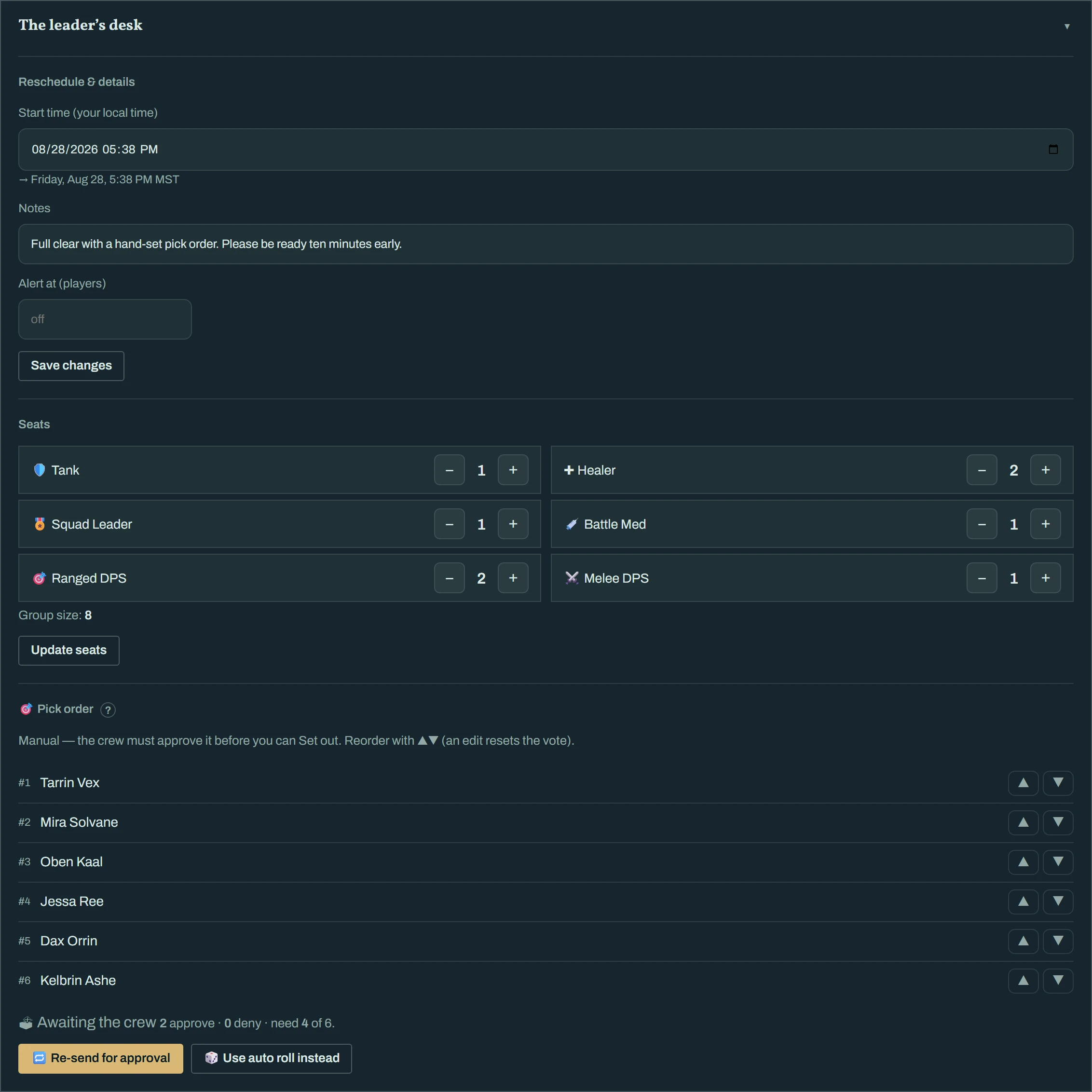
| Block | What it does |
|---|---|
| Reschedule & details | Change the start time, notes, or the join-alert threshold. Save changes. A time change DMs everyone on the roster. |
| Seats | Steppers per role and the live Group size. Update seats. Adding a seat promotes the first person on standby automatically. |
| Pick order | Only for Pick-order runs — auto (sealed roll at set-out) or manual with crew approval. See Posting a run. |
| ✉️ Invite members | Search a name, click Invite. They get an Accept/Decline DM. On an invite-only run this is the only way in. |
On the roster, ✕ next to a member removes them. A reason is required and is DM'd to them word for word and written to the run log — there are no silent removals.
People often sign up under the wrong seat — a healer taps Ranged DPS, a tank lands on standby. You do not have to remove them and ask them to sign up again: on the roster, ⇄ next to a member opens the seat list; pick the right one and they move, keeping their signup, note and wish list. It works while the run is forming and while it is underway.
- If the seat you pick has no room, the run grows that seat by one for them — you will see the group size tick up on the desk. The group can never go past 12.
- Someone on standby moved to a seat with room comes off standby into that seat.
- The seat they left becomes free; while the run is still forming, the first person on standby for that seat is promoted automatically, exactly as if you had added a seat.
- The member gets a short DM saying where they now sit, and the run log records the move.
In Discord the same control is ⇄ Move a member on the leader console: choose the member, then the seat.
Click ▶ Set out in the run's header when you are leaving. Three things happen at once:
- Everyone signed on, tentative or late is marked attended — you fix exceptions afterwards, not before.
- A private 🔊 voice channel opens in Discord that only the roster can see and join, and the run thread gets the link. Each attendee gets a "wheels up" DM with the voice and thread links and your notes.
- The board flips the run to Underway. Nobody else can take a seat.
A group that came for one heroic often decides to keep going. You do not post a second run — you add the next heroic to the one you are already on, and the roster, thread and loot session carry straight through.
On the desk, the Heroics in this session block lists what the run covers. Tick the heroics you are adding and press Add to session. It works while the run is forming and while it is underway; the thread gets a one-line notice, and:
- Log a drop now searches the loot lists of every heroic on the session, and drops the Chat-log Loot Watcher records from the new heroic's bosses are attributed to it.
- At Wrap-up, everyone attending is credited a clear for each heroic listed — so only add what the group actually runs.
- While a run is still forming, people watching the added heroic on the board get the usual new-run alert.
Added the wrong one? Press ✖ on its chip. That only works until a drop or boss kill has been recorded against it — after that it stays, because the loot already belongs to it.
In Discord the same control is 🗺 Add heroic on the leader console.
In the roster, 🚫 marks a member as a no-show — no run credit, no rolls — and ↩ restores them. Do this before you wrap up; the wrap-up credits whoever is marked attended at that moment. Someone who said they were running late and then turned up needs nothing from you: late counts as attended at wrap-up.
People leave and people join. The rule is simple: every roll is among whoever is marked attended at the moment it happens.
- Someone has to leave. Press 🎲 Roll what's dropped first (below) so they are in the dice for everything that dropped while they were there, then remove them with ✕ on the roster (a reason is required, same as while forming) — or just leave them as a no-show with 🚫. Either way they are out of every roll after that. If a standby was waiting for that seat, they are promoted straight in.
- Bringing someone new in. Open ➕ Add a member on your desk (web or app) or ➕ Add a member… in the Discord console, search the name and pick their seat. They land as attended immediately, get a DM with the run and voice links, and are in the dice for every drop still pending and everything after. A full seat grows by one for them, never past 12.
- The run keeps going — nothing here ends it. Wrap up when the group is done, as always.
Not everyone in the group is in Discord. A guest is a seat you create by name so that person is in every roll like anyone else — and because they cannot press anything, you answer every loot choice for them.
- Adding a guest. On your desk press 👤 Add a guest, type their name as it appears in game and pick their seat. While the run is forming they take a normal seat (a full seat refuses, exactly as a signup would — grow the seat first); once the run is underway they land as attended and a full seat grows by one for them, never past 12. In Discord the same control is 👤 Add a guest on the leader console.
- What a guest is. A roster member with a 👤 guest badge. They count as a seat, they are in the dice for every drop recorded while they are attended, their wins show under their name in the run and the loot ledger, and Received works for them from your side. They get no DMs, no thread or voice access, and no run credit or rank — there is no account to credit. Remove one with ✕ like anyone else.
- Leader picks for me. Any seat — guest or not — can be set to the leader picks for this seat. On the roster, tick 🧑✈️ Leader picks next to a member (in Discord: 🧑✈️ Leader picks for… on the console); a member can tick the same box on their own row when they are happy for you to decide for them. Guests are always ticked and cannot be unticked. The run log records every change.
When a seat is set that way, its choices come to you and use the same rules as everyone else's:
| Rule | What you do for the seat |
|---|---|
| Group roll | Nothing — the seat is simply in the dice. |
| Need / Greed | On an open claim press Choose for… (Discord) or the seat's Need / Greed / Pass control on the run page. If you never answer, the seat counts as Pass at the timeout, same as a silent member. |
| Pick order | When the seat's turn comes the pick is yours: the turn card says <name>'s pick — the leader chooses and the item list answers to you. You can also set the seat's ranks and auto-pick ahead of time, and a stalled turn still auto-picks on the timeout. |
| Wish list | Set it from the wish-list editor's for: selector so wrap-up proposals treat the seat like everyone else. |
Everything you do for a seat is written to the run log as done by you on their behalf, and the loot is assigned to the seat, never to you.
🎲 Roll what's dropped rolls every pending drop right now among the current attendees, shows each d100 in the thread exactly like a single roll, DMs the winners, and leaves the run underway. Drops recorded after that are rolled at the next press or at wrap-up. In a Need / Greed run it settles every open claim instead (non-responders count as Pass). Pick-order runs don't have it — their drops wait for the draft. It is greyed out when nothing is pending, and it is not offered while the wrap-up window is open (use Roll the rest there).
Every recorded drop also captures who was in the group at that moment — shown as 👥 With: … under the drop on the run page, in the thread's loot posts and in the console. It is taken automatically when the drop is recorded and never changes afterwards, so a group that changed mid-run still shows exactly who was there for each drop.
The Log a drop block appears once you are underway:
- Pick the item from Browse instance loot… — the list is grouped into Heroic Boss Loot, Weapon Enhancements and Other items — or type a name. A name the catalogue does not know is recorded as a custom drop.
- Add the boss it came from if you know it (optional; for catalogued items the boss list is suggested).
- Click Add drop.
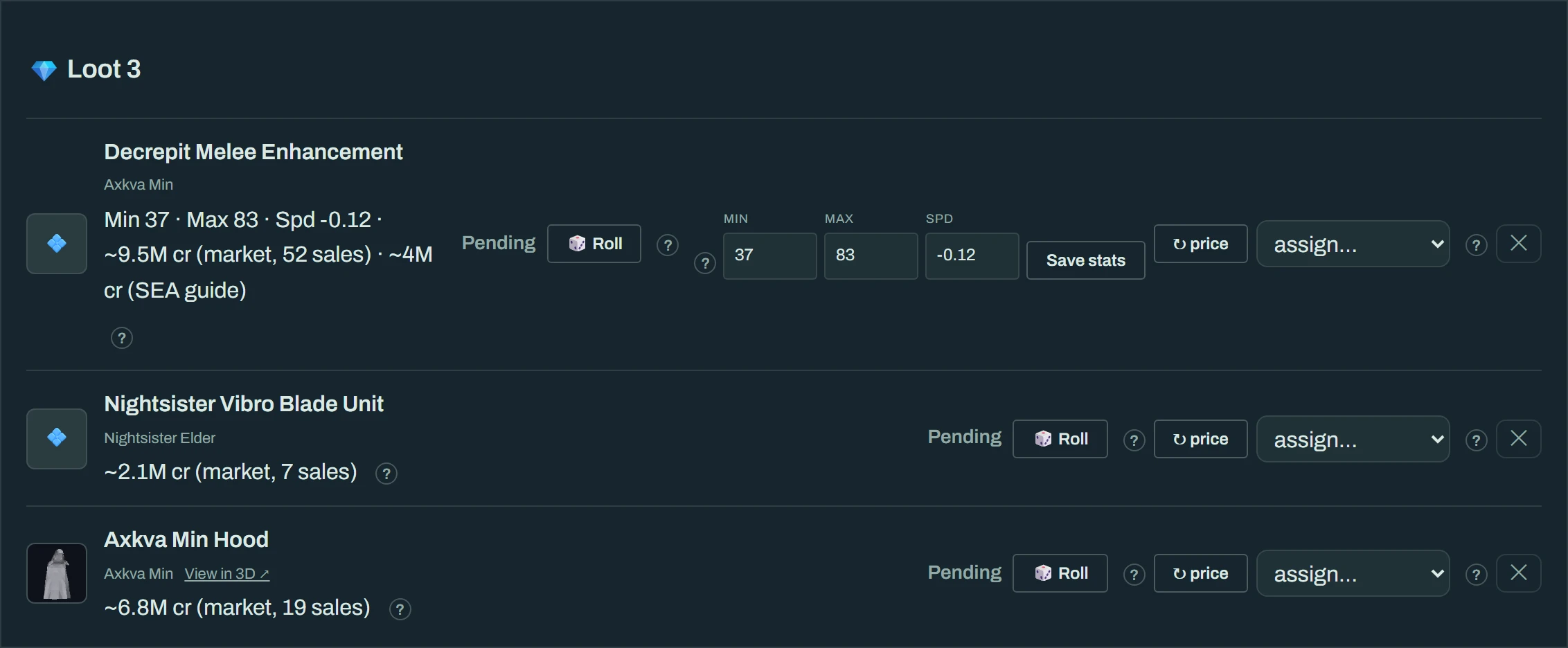
Each drop then shows as a row with:
| On the row | Meaning |
|---|---|
| Boss tag | Where it dropped. |
| Stats | For variable items (weapon augmentations, decrepit enhancements, Gorax shards, Rancor teeth, Krayt tissue and pearls, and so on) the leader enters the rolled values — Min/Max, Speed, Stat/Value, Crit, Health, Quality. Save stats writes them to the drop so members ranking it can tell two of the same item apart. Speed is entered as the game shows it — a negative number like -0.12. Champion's jewelry (every bracelet, band, bangle, symbol, necklace and pendant, left or right) rolls three attributes — one +40 and two +25 from Defense General, Endurance, Melee General, Toughness, Opportune Chance and Ranged General — plus a +35 defense skill mod (Ranged Defense, Melee Defense, a weapon defense such as Two-Handed Defense, or a state defense such as Defense Vs. Knockdown); the row shows four pickers for exactly those rolls. |
| View in 3D ↗ | Opens the item in the Tailor Studio when a model exists. |
| ✕ | Deletes the drop from the run. |
Junk that nobody rolls for — isomerase enzymes, unknown crystal fragments — is filed under Other drops below the list and is left unclaimed at wrap-up. Promote to roll moves one into the real list if you want it rolled after all.
!stat min=37 max=83 spd=-0.12. Everything on this page still applies to those drops.What you press next depends on the loot rule you chose. The full detail for each is in Loot — the three ways; the short version:
| Rule | During the run | To finish |
|---|---|---|
| Group roll | 🎲 Roll on any drop whenever you like; the roll is shown to everyone. Or assign a drop by hand (a reason is required and logged). | Wrap up loot opens one 3-minute window in which every still-pending drop is proposed, then Distribute now. |
| Need / Greed | Each drop opens a claim; members press Need, Greed or Pass. ⚖ Resolve now settles one early — non-responders count as Pass. | Same Wrap up loot → Distribute now. Open claims are settled first. |
| Pick order | Members rank the drops from their own page. | Start picks reveals the order and runs the snake draft in the thread, one turn at a time. ⏭ Skip their turn moves a stalled picker on; ⏹ End picks & wrap up ends the draft early and rolls whatever is left. |
Every wrap-up ends the same way: each attendee's run credit is written, winners are DM'd what they won, the results card goes to the run channel, the thread is archived and the voice channel is closed. The run shows Done.
Roll the rest. When nobody minds which remaining drop they get, press 🎲 Roll the rest. Kith rolls a d100 among the attendees for every unclaimed drop, shows every number (including tie re-rolls) in the loot window and Discord, and records those dice with the finished run. In a pick draft, the same button ends the draft and finishes the run; in the wrap-up window you can still override one result before pressing Distribute now.
Excluding drops. Check Exclude from loot on anything the group is not distributing. Everyone sees 🚫 Excluded by leader, and the drop moves into the collapsed Excluded list instead of appearing in rolls, claims, picks, or unclaimed feed. The drop is not deleted: it stays in the run and still counts in drop history. Uncheck it to restore the drop while the run is underway.
Until a winner actually has the item, the drop shows held by [you]. When you hand it over in game, either of you presses Received on the run page. If a drop is still held 24 hours after the run, the bot reminds you both once.
An underway run that is never wrapped up nudges you by DM at 3 hours and again at 12. At 48 hours it wraps itself up: attendance is credited as it stands, any drop still pending is left unclaimed, and a stalled draft is closed. Better to press Wrap up loot yourself.
A Steward — an account carrying the estate admin role — can open any run, invite-only ones included, and use the leader console on it exactly as the leader would: seats, set out, drops, the loot decision, wrap-up. The leader stays the leader: their name keeps the Leader tag and the run stays theirs. Stewards see a small acting as a Steward line on the console so it is always clear whose run they are on. On Discord the same ⋯ Console button on the run card opens it for a Steward.
Read this page on the web — and share it — at https://kith-swg.com/guide/lfg-lead/