The Kith Guide › The Shuttleport
🪧 The board and taking a seat
Read a run row in two seconds, filter to what you can fill, take a seat, go tentative or late, use the standby list, and answer an invite.
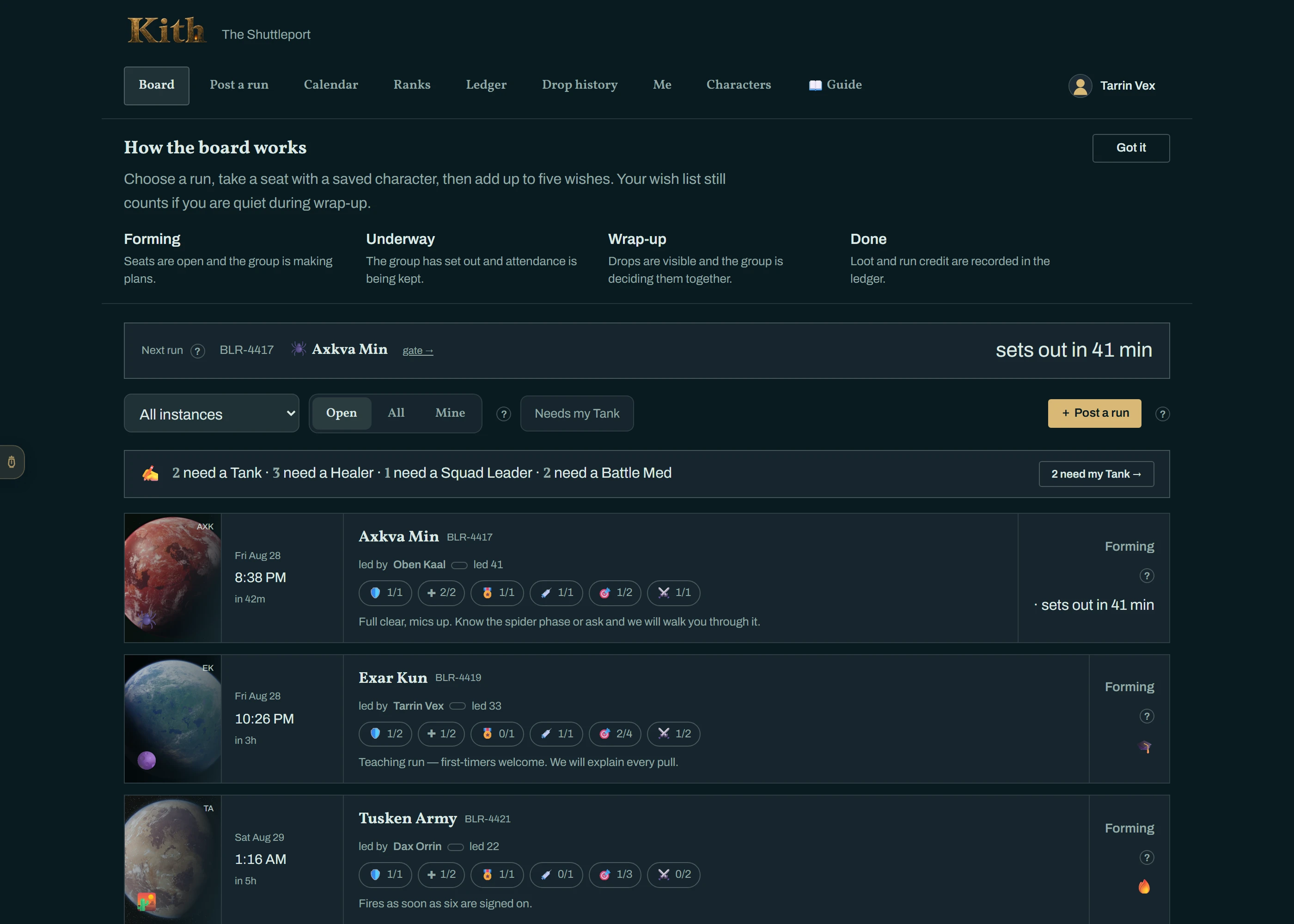
The first time you open the board, a How the board works strip explains the four states in one line each. Click Got it and it stays hidden.
On any run page, the 🔗 button copies a share link for that run — paste it in Discord or anywhere and it opens the same run.
Each row is one run. Left to right:
| Part of the row | What it tells you |
|---|---|
| Planet plate | Which instance, at a glance — Dathomir for Axkva Min, Hoth for Echo Base, and so on. |
| Time | The day, the local start time, and how long until it leaves (in 42m). A blank time means "forming now — leaves when the leader says". |
| Flight number | The run's ID, like BLR-4417. Quote it when you talk about a run; the Discord thread has the same name. |
| Led by | Who is running it, their rank, and how many runs they have led. |
| Role pips | Seats per role — 1/2 means one of two Tank seats is taken. An outlined pip is a seat you could fill. |
| Notes | Whatever the leader wants you to know before you sign on. |
| Tags | 🎓 a teaching run · 🔥 fires once N have signed on · 🔒 invite only · 🎲 Need/Greed or 📋 Pick order for the loot rule. |
| State | Forming, Gathering, Underway, Wrap-up or Done — see How a run moves. |
| Control | What it does |
|---|---|
| Instance | Narrow the board to one heroic. |
| Open / All / Mine | Open hides finished runs · All shows everything including done runs · Mine shows only runs you are in or leading. |
| Needs my role | Only runs with an empty seat your default role can fill. The fastest way to find a group. |
| Next run strip | The top bar always shows the very next departure with a live countdown and a gate → link. |
- Click the row. The run's gate page opens.
- In the Take a seat box, check your character, pick the role you are bringing, and add a note if it helps ("on voice", "first time here").
- Click Take this seat.
That is it. The seat is yours, the leader is notified, and you get a seat-confirmation DM with the time and a link back. If it is a scheduled run, the bot also reminds you before departure (default 30 minutes; change it under Me).
Not sure yet? Tick Tentative when you take the seat, or click Mark tentative afterwards. You still hold the seat and count toward the group; the leader just sees a tentative chip next to your name. Click Confirm going when you know.
Once the run is Underway you cannot change your seat. Say you are on your way in the run's Discord thread — the leader keeps attendance from the roster and can flag you as running late rather than a no-show. Anyone still marked late when the loot is wrapped up is counted as having attended.
If every seat for your role is taken you can still sign on — you go on the standby list with a position number. The moment a seat frees (someone withdraws, is removed, or the leader adds seats) the first person on standby is promoted automatically and DM'd. You do not need to watch the board.
A leader can invite you directly. You get a DM with Accept and Decline, and on the run page a banner: You're invited to this run — Accept — pick a seat takes you to the seat box. Declining tells the leader quietly.
A 🔒 invite only run never appears on the public board; the only way in is an invite.
On any run you are on, the 🎯 Wish list panel lets you add up to five drops from that instance, in order. Two things it does:
- At wrap-up, if a drop you wished for is uncontested, it is yours even if you are away — "Your wish list stands during wrap-up even if you are silent."
- In pick-order runs it seeds your ranking (see Loot — the three ways).
Leave Remember for [instance] ticked and the same list is applied the next time you join a run there.
#lfg-runs is one pinned board: a table of every run forming or underway — run, heroic, state, when, leader, seats — with a link to each run's thread. Open the thread and the run card is pinned at the top with one button per open role — pressing Healer · 1 left is the same as taking the seat on the website. The card also has Tentative, Withdraw, and 🎯 Wish list. See Wayfinder.
Read this page on the web — and share it — at https://kith-swg.com/guide/lfg-join/