The Kith Guide › The Shuttleport
📝 Posting a run
Every field on the Post a run form: plain-language times, seats, the loot rule, thresholds, teaching runs, weekly repeats, templates, invite-only, team sessions and sandbox runs.
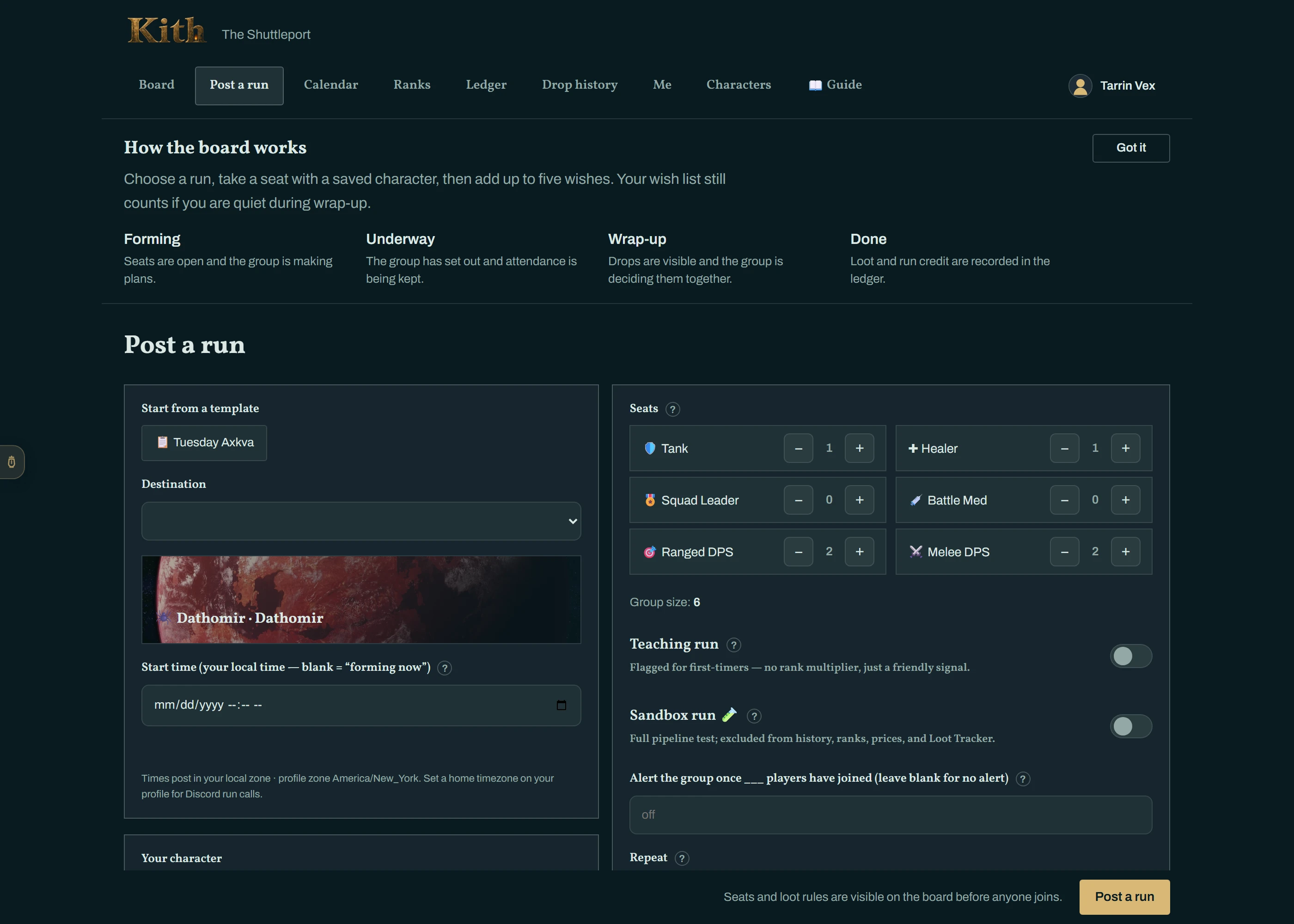
Click + Post a run from anywhere on the board. The form has more on it than you need for a normal run — the first four fields are the run; everything after Loot is optional and does nothing until you touch it.
| Field | What to put |
|---|---|
| Destination | The heroic. The planet plate updates as you pick. |
| Start time | Your local time. Leave it blank for a "forming now" run that leaves whenever you press Set out. |
| Seats | How many of each role you want — Tank, Healer, Squad Leader, Battle Med, Ranged DPS, Melee DPS. The defaults suit a standard group for that instance; the total (up to 12) is shown as Group size. Your own seat is included. |
| Your character / Your role | The seat you are taking yourself. |
| Notes | Requirements, what you are skipping, whether you will explain the fight. This is the line people read before they sign on. |
Click Post a run. You land on the run page; the card is in Discord seconds later and everyone subscribed to that instance is DM'd.
On the website the time is a normal date picker. In Discord (and in the "Convert to LFG post" menu) it is plain language, read in your timezone:
| You type | It means |
|---|---|
tonight 8pm · tonight | Today at 20:00 (8pm is the default for "tonight"). |
tomorrow 21:30 · tmrw 7 | Tomorrow. A bare 7 means 7 pm. |
friday 8pm · next fri 20:00 · this sat noon | The next such weekday. If it is already Friday and 8pm has passed, next Friday. |
jul 4 8pm · 4 jul 20:00 | A date. |
8pm · 20:00 | Today if still ahead, otherwise tomorrow. |
+2h · +90m · +1h30m | From now. |
Times already past, or more than 60 days out, are refused.
The one setting worth thinking about. It decides how drops are handed out at the end, and it changes what buttons your group sees:
| Rule | One line | Best when |
|---|---|---|
| Group roll (default) | Each interested attendee gets a public d100 roll for each drop. | You want it quick and familiar. |
| Need / Greed | The group marks upgrade, want, or pass before each result. Need beats Greed. | Upgrades should go to people who will use them. |
| Pick order | The crew approves an order before departure, then takes turns choosing at wrap-up. | Big loot tables, or a group that likes to plan. |
Read Loot — the three ways before choosing Pick order the first time; it has more moving parts.
| Setting | What it does |
|---|---|
| Teaching run 🎓 | Flags it for first-timers — no rank multiplier, just a friendly signal that you will explain the fight. |
| Alert the group once N players have joined 🔥 | The moment the Nth person signs on, the bot posts "the hunt is on" in the channel and DMs the whole roster. Use it for "forming now" runs. |
| Repeat | Weekly or Biweekly creates a series: the same run is re-posted a week ahead, every time, until you stop it (Me → Templates on the web, /lfg series stop in Discord). Needs a real start time. |
| Invite only 🔒 | No public card. You invite members from the run page or Discord; each gets an Accept/Decline DM. |
| Team session — multiple heroics | Tick the other heroics this one session clears. Everyone attending gets a clear credited for each of them, not just the first. You can add more later from the leader's desk, even once underway — see Adding another heroic. |
| Save this layout as a template | Stores instance, seats, notes, threshold and the teaching flag. Next time, the template chip at the top of the form fills it all in. |
| Sandbox run 🧪 | A full dress rehearsal — threads, cards, loot, wrap-up — that is excluded from history, ranks and the Loot Tracker. Offered once you have completed a run. |
Test players (sandbox only). On a sandbox run the leader's desk (and the Discord console) has 🤖 Fill with test players: synthetic members named Test-… take the open seats and behave like real players in every loot mode — they are in every group roll, answer Need/Greed claims, pick on their draft turns, keep a wish list for wrap-up and confirm what they receive — so you can rehearse a whole run alone. They never get DMs, never appear in rankings, and 🧹 Clear test players (or purging the sandbox) removes them. The buttons refuse to work on a real run.
If you chose Pick order, the leader's desk on the run page has a Pick order block while the run is forming:
- Auto (the default) — a snake d100 roll runs the moment you set out, kept sealed until you hit Start picks. Nothing to do.
- ✍ Set order manually — drag the roster into the order you want. A manual order must be approved by a majority of the crew before you can set out: click 📢 Request approval, and everyone on the roster gets an Approve/Deny banner and a DM. Editing the order resets the vote. 🎲 Use auto roll instead takes you back to auto at any time.
- Edit — on the run page, the leader's desk has Reschedule & details (time, notes, threshold) and Seats. Changing the time DMs everyone on the roster; adding seats promotes anyone on standby.
- Invite — the ✉️ Invite members box searches Kith members and sends the invite.
- Call off — the red button in the run's header. Everyone signed on is DM'd, with your reason if you give one. Always better than not showing up.
A forming run that nobody sets out lapses 24 hours after its scheduled time (7 days for a "forming now" run).
Read this page on the web — and share it — at https://kith-swg.com/guide/lfg-post/