The Kith Guide › Resources
🌍 Resources · Live Resources
Browse the resource database, filter by type and stat, and watch what is spawned now.
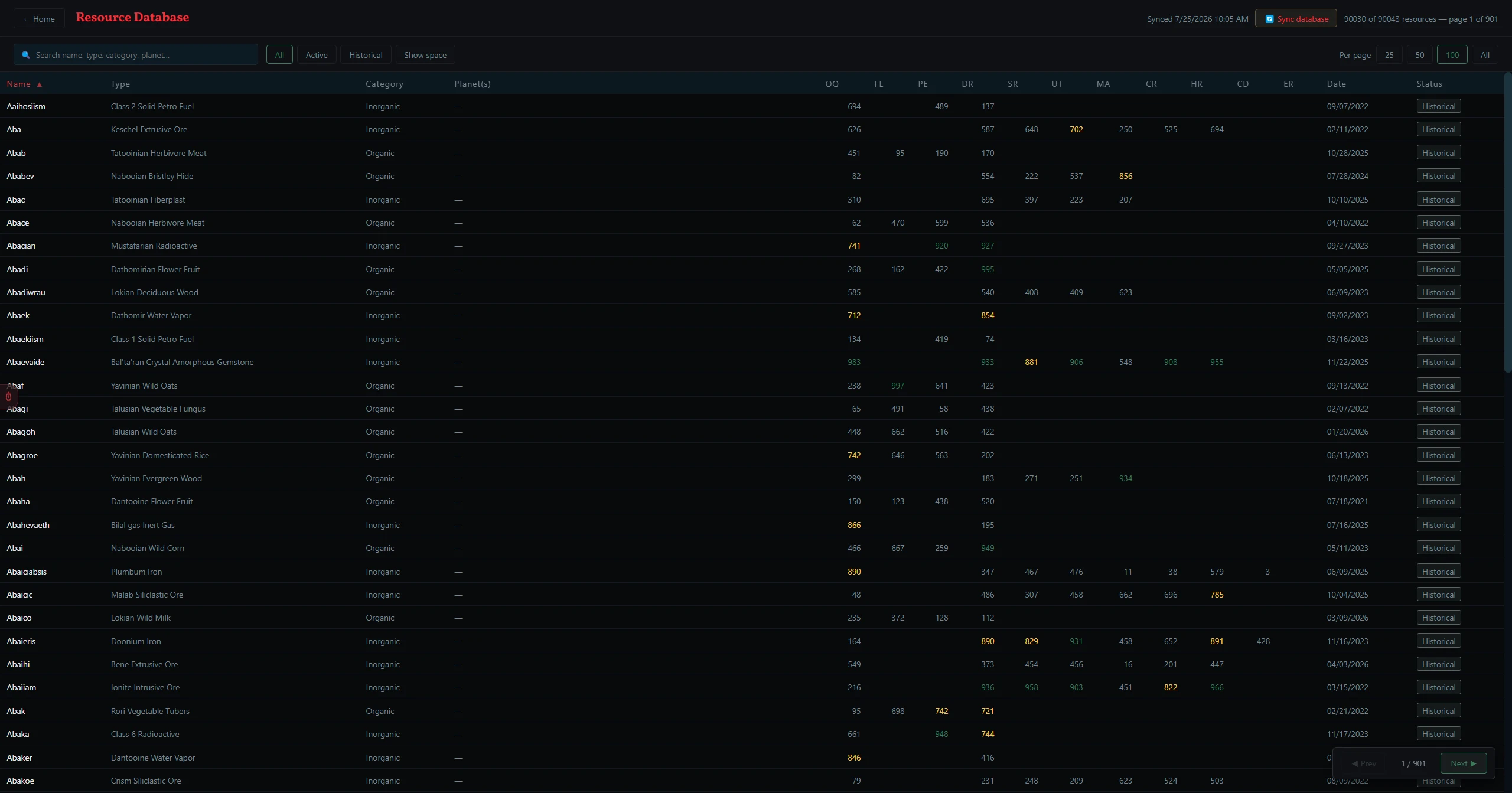
Resources is one tool with two tabs: Live Resources (this page) and My Inventory. Live Resources is a live, searchable list of every resource currently spawning on the server — and every resource that has ever spawned. It syncs from a shared Firebase database that an admin updates from in-game resource survey data.
How Resource Data Gets to You
Resources on the server spawn and deplete constantly. The Workshop keeps a shared copy of that data in Firebase: an admin surveys the latest spawns in-game and pushes them up, and everyone else pulls them down with one button. You never edit this database yourself — you just sync to get the newest data.
Admin surveys spawns in-game→⬆ PUSH DB (admin)→Firebase (shared)→🔄 SYNC (you)
Syncing & Viewing Resources
- Click 🔄 SYNC DATABASE to pull the latest resource data. The "last synced" timestamp next to the button tells you how current your copy is — if it's hours or days old, sync again.
- When a sync brings in resources you didn't have before, a ✓ DATABASE SYNCED — NEW RESOURCES ADDED panel pops up listing what's new, so you can spot fresh high-quality spawns at a glance.
- The table loads with all resources. Click any column header to sort — click again to reverse.
- Stat cells are color-coded: green = high quality, gold = medium, dim = low.
- Click any row to open its Top Uses ranking — the schematics where that resource scores best, so you can see at a glance what it's good for.
Tip: Make it a habit: Sync at the start of a crafting or shopping session. The Crafting Tool and the My Inventory tab autocomplete both read from this same database — sync first and their recommendations reflect what is actually spawning right now. The ⭐ Spawn Watch alerts on the My Inventory tab also fire as each sync brings in new spawns, so syncing is what triggers your "this resource just spawned" notifications. For the whole picture — database, Best Craftable, Inventory, Holdings and both kinds of watch — read Resource Tracking, End to End.
Filtering Resources
| Filter | What it does |
|---|---|
| Search | Filters by resource name, type, category, or planet. Partial matches work. |
| ALL | Shows every resource in the database, active and historical. |
| ACTIVE | Shows only resources currently spawning in-game. |
| HISTORICAL | Shows only depleted resources — useful for checking quality over time. |
Admin: Pushing Updates
Admin only: Press Ctrl+Shift+A to reveal the ⬆ PUSH DB and ↩ ROLLBACK buttons. ⬆ PUSH DB uploads the current local resource database to Firebase so all users see updated data when they sync (a progress log shows each resource being written) — only push after importing fresh survey data. ↩ ROLLBACK restores the database to the state before your last sync if a push went wrong.